



-
Geotechtronics GmbH
Pollinger Str. 3 • D-82362 Weilheim i.OB -
Office hours
Mo-Sa: 9:00-18:00
TIJ Printers and PLCs (Programmable Logic Controllers)
TIJ printers (Thermal Inkjet printers) are industrial inkjet printers that transfer ink onto products and packaging using thermal printing technology. They are used to mark cardboard packaging, plastic components, metal surfaces, wood, glass and many other materials.
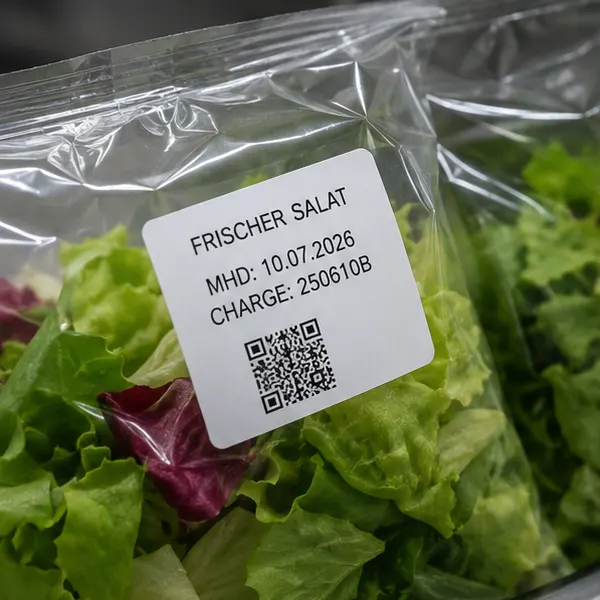
Typical applications include printing best-before dates, batch numbers, serial numbers, barcodes, QR codes, Data Matrix codes and product information. Thanks to their compact design and relatively straightforward integration, TIJ printers are particularly well suited to automated production and packaging systems.
When a TIJ printer is connected to a programmable logic controller (PLC), printing operations can be integrated into the automated production workflow. For example, the PLC can trigger the start of printing, provide product-specific print data and, depending on the technical capabilities of the system, process printer status messages.
What Does PLC Integration Mean for a TIJ Printer?
PLC integration refers to the technical connection between the TIJ printing system and the machine controller. The aim is to control printing processes automatically, reduce manual intervention and coordinate product marking with other production steps.
Communication can take place via digital inputs and outputs, serial interfaces or industrial communication protocols. The appropriate solution depends on the PLC being used, the printer model and the requirements for data transmission.
For example, a basic PLC integration allows a sensor to detect a passing product and the PLC to send a print trigger to the TIJ printer. A more advanced integration can also transmit changing print texts, serial numbers or batch information and monitor the printer's operating status.
What Tasks Can a PLC Perform in Print Control?
1. Automatic print triggering
A sensor detects when a product reaches the printing position. The PLC processes the sensor signal and triggers the printing process at the right moment. This allows products on conveyor belts to be marked automatically without an operator having to start each print job individually.
2. Transferring variable print data
The PLC or a higher-level production system can provide different print data depending on the current production order. Examples include batch numbers, production dates, serial numbers and order-specific markings.
This requires the printer to support the transmission and processing of this data through its available interface. Some systems allow operators to select a predefined print layout, while others support changing variable fields within an existing print job.
3. Printer status monitoring
Depending on the interface, the TIJ printer can send information about its operating status back to the PLC. This may include operational readiness, printing activity or detected faults.
The PLC can use this information to issue warnings, initiate a machine stop or prompt an operator to carry out an inspection. The messages actually available depend on the printing system.
4. Synchronization with the production process
Connecting the printer to the PLC allows printing operations to be synchronized with conveyor movement and the production workflow. For example, an encoder can measure product movement and provide the basis for precise print triggering, provided the printer and controller support this functionality.
Which PLC Protocols Are Suitable for TIJ Printers?
Various protocols and interfaces can be used for communication between a PLC and an industrial TIJ printer. They differ in their technical operation, industry adoption and ability to exchange print data and status information.
The following table provides an overview of common options for integrating TIJ printers into production lines using PLCs.
| Protocol or Interface | Typical Application | Potential Application for TIJ Printers |
|---|---|---|
| PROFINET | Industrial Ethernet networks, frequently used with Siemens PLCs | Exchange process data, control information and status messages, provided the printer supports PROFINET. |
| EtherNet/IP | Automation systems using controllers from Rockwell Automation and other compatible manufacturers | Integrate printing systems into industrial network communication and exchange defined control and status data. |
| Modbus TCP | Ethernet-based communication between compatible automation devices | Exchange supported commands and status values via registers. Transmitting print text is not automatically part of the interface. |
| OPC UA | Networking automation systems and higher-level applications | Exchange structured operating data and status information, provided the printer or a suitable gateway offers the required functionality. |
| TCP/IP with Manufacturer-Specific Protocol | Direct Ethernet communication between PLC and printer | Select print jobs, transmit variable data or query status information if the printer software supports the corresponding commands. |
| PROFIBUS DP | Existing industrial fieldbus installations | Integration via a compatible printer interface or a suitable gateway. |
| EtherCAT | Automation systems using an EtherCAT network | Connection via a native interface supported by the printing system or a suitable integration solution. |
| Modbus RTU | Serial communication, typically via RS-485 | Transmit defined commands and status values between compatible devices. |
| RS-232 | Serial point-to-point connection | Transmit print data or control commands, provided a corresponding communication protocol is documented. |
| Digital Inputs and Outputs (I/O) | Basic machine control without extensive data exchange | Trigger printing and transmit available signals such as Ready, Printing or Fault. |
Important: Not every TIJ printer supports all the protocols listed above. An Ethernet port alone does not mean that PROFINET, EtherNet/IP or Modbus TCP is available, for example. Before selecting a system, check the technical interfaces and communication manual of the specific printer.
Examples of PLC Integration for TIJ Printers
Example 1: Automatic Printing of Best-Before Dates
In a packaging line, cartons must be automatically marked with a best-before date and a batch number.
A sensor detects the carton on the conveyor belt. The PLC processes the signal and triggers printing. The required print data can be configured on the printer beforehand or, if supported, transmitted by the PLC or a higher-level system.
Potential benefits:
- Automatic printing without manual operation
- Consistent processes at high production volumes
- Easier changeovers between production orders
- Reduced data entry errors when changing batches
Example 2: Transmitting Serial Numbers Directly from the PLC
In the manufacture of technical components, each product requires a unique serial number. The PLC manages or receives the sequential number and transmits it to the TIJ printer.
The printer marks each component with the designated identifier. For this process to work reliably, data transmission, print job acknowledgement and the assignment of each serial number to the corresponding product must be implemented correctly.
This application requires a documented interface through which the printer can receive variable print data. A simple trigger signal is not sufficient.
Example 3: Printing QR Codes and Data Matrix Codes
In an automated production line, products must be marked with individual QR codes or Data Matrix codes. These codes may contain a serial number or a reference to a record in the enterprise resource planning (ERP) system.
The PLC or a higher-level system provides the required data. The TIJ printer generates the appropriate code, provided the printing software and selected interface support this functionality.
For reliable traceability, suitable code verification is also recommended. A scanner can check the printed code and send the verification result back to the PLC. The scanner requires its own suitable communication connection.
Example 4: Monitoring Printer Status and Reporting Faults
A TIJ printer is integrated into a packaging system. During operation, the PLC monitors the available status signals.
If the printer reports a fault or is no longer ready for operation, the PLC can issue a warning or bring the system to a controlled stop. This helps identify unmarked products and production interruptions more effectively.
The operating conditions that can be monitored depend on the printer's available functionality. For example, not every printer automatically reports a low ink level or confirms successful printing for every individual product.
Example 5: Automatically Changing Print Data When Products Change
Different products are manufactured on the same production line. When switching production orders, the print content must be updated.
The PLC detects the new production order and initiates the selection of the appropriate print layout or transmits the new variable data. The printer then marks the products with the correct information.
This solution can reduce changeover times and eliminate the need for manual adjustments on the printer. It requires print job selection and the necessary variables to be controllable through the supported interface.
Customized Solutions for PLC Integration of TIJ Printers
PLC integration makes TIJ printers a flexible component of automated manufacturing and packaging systems. Depending on the available equipment, printing operations can be triggered automatically, variable print data can be transmitted, product changeovers can be controlled and status information can be evaluated.
Geotechtronics GmbH supports businesses in selecting and integrating suitable TIJ printing systems for automated production and packaging lines. NasaJet® printing solutions and tailored technical consulting help adapt marking processes to the specific requirements of each installation. Whether you need simple print triggering via digital inputs and outputs, the transmission of variable print data or integration into existing PLC-controlled production workflows, Geotechtronics can help you identify a suitable solution for your application. Contact the Geotechtronics team to explore the available technical options and implement a printing solution tailored to your production processes.

Copyright ©Geotechtronics GmbH, GERMANY • Handheld mobile printer - portable printing solution.